With LiteLLM as a gateway between OpenCode and your model providers, OpenChamber becomes ready for teams: one key per person or project, fixed budgets for multi-run, and one central rule for which providers ever get to see your code.
In my article OpenChamber: Steering and Reviewing AI Coding Agents, I showed how OpenChamber makes agents visible and their results reviewable. As soon as more than one person works with it, three questions come up: Who keeps an eye on costs when a single task runs on five models in parallel? Where do the API keys live? And how do you make sure source code only ends up with approved providers?
The answer is one additional layer: LiteLLM. This article shows you how to combine the two in three steps on your own infrastructure.
What is LiteLLM?
LiteLLM is an open-source gateway from BerriAI. It provides a single, OpenAI-compatible API and forwards requests to more than 100 providers: Anthropic, OpenAI, Azure OpenAI, AWS Bedrock, Google Vertex AI, Mistral, and also self-hosted models running on Ollama or vLLM.
For use with OpenChamber, these features matter most:
- Virtual keys: Users and projects get their own keys. The real provider keys stay on the gateway.
- Budgets and rate limits: You can set spending caps and request limits per key, team, or project.
- Model aliases and fallbacks: A stable name like
coding-defaultcan automatically switch to another model during outages or when limits are hit. - Cost and usage logging: Every request is tied to a key and recorded with its cost.
Why LiteLLM belongs in front of OpenChamber
OpenChamber doesn’t generate any code itself. All inference runs through the providers configured in OpenCode. That is exactly where LiteLLM comes in: you add it to OpenCode as a single provider, and OpenChamber automatically lists the models behind it. Nothing changes in OpenChamber itself.
The benefit is most obvious with multi-run. If you send one task to five models at once, you use roughly five times as many tokens. Without a gateway, those costs are spread across several provider accounts and only show up on the monthly bill. With LiteLLM, a hard cap kicks in before things get expensive.
The architecture: one more layer, a lot more control
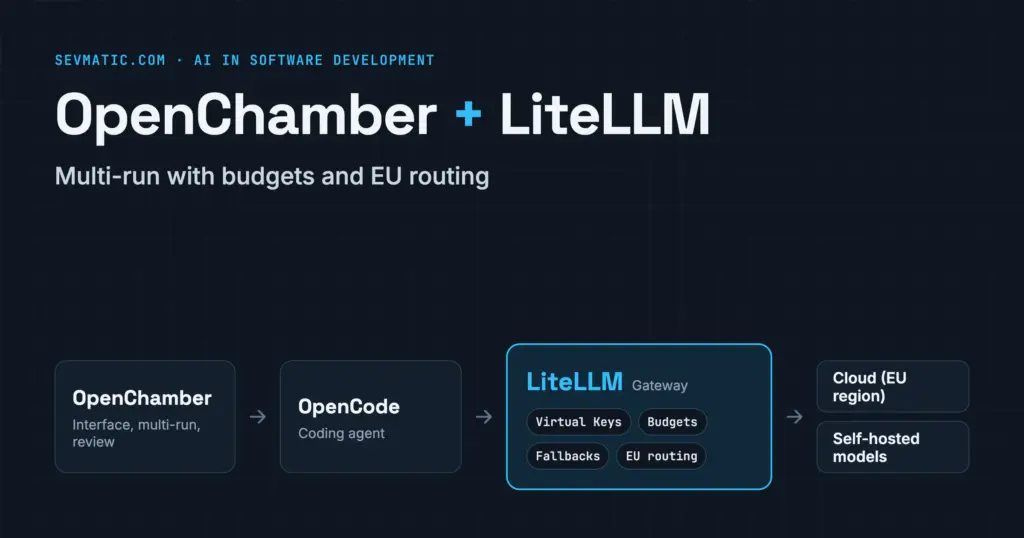
A request from OpenChamber now passes through four stations:
- OpenChamber is the interface: sessions, multi-run, review.
- OpenCode is the agent. It only knows one provider called LiteLLM and one virtual key.
- LiteLLM checks the key, the budget, and the allowed models, logs the request, and picks the target provider.
- The model provider (cloud or your own server) answers the request.
Ideally, OpenChamber, OpenCode, and LiteLLM run on the same server or within the same internal network. LiteLLM doesn’t need to be reachable from the internet.
Step 1: Run LiteLLM as a Docker stack
LiteLLM runs as a container, together with a PostgreSQL database for virtual keys and cost logging. You can deploy the following stack directly with Docker Compose or as a stack in Portainer:
services:
  litellm:
    image: ghcr.io/berriai/litellm:main-stable   # pin to a fixed version in production
    command: ["--config", "/app/config.yaml", "--port", "4000"]
    volumes:
      - ./config.yaml:/app/config.yaml:ro
    environment:
      LITELLM_MASTER_KEY: ${LITELLM_MASTER_KEY}   # starts with sk-
      LITELLM_SALT_KEY: ${LITELLM_SALT_KEY}       # encrypts stored provider keys
      DATABASE_URL: postgresql://litellm:${DB_PASSWORD}@db:5432/litellm
      ANTHROPIC_API_KEY: ${ANTHROPIC_API_KEY}
    ports:
      - "127.0.0.1:4000:4000"   # local access only
    depends_on: [db]
    restart: unless-stopped

  db:
    image: postgres:16
    environment:
      POSTGRES_USER: litellm
      POSTGRES_PASSWORD: ${DB_PASSWORD}
      POSTGRES_DB: litellm
    volumes:
      - litellm-db:/var/lib/postgresql/data
    restart: unless-stopped

volumes:
  litellm-db:
You define the models in config.yaml. The value under model_name is the name OpenCode and OpenChamber will see later:
model_list:
  - model_name: claude-sonnet
    litellm_params:
      model: anthropic/claude-sonnet-5
      api_key: os.environ/ANTHROPIC_API_KEY

  - model_name: local-coder
    litellm_params:
      model: ollama/qwen3-coder
      api_base: http://ollama:11434

router_settings:
  fallbacks:
    - claude-sonnet: ["local-coder"]

general_settings:
  master_key: os.environ/LITELLM_MASTER_KEY
  database_url: os.environ/DATABASE_URL
This example assumes an Ollama container is running on the same Docker network. If Claude is unavailable or the limit is reached, the local model takes over automatically.
Once it’s running, the admin UI is available at http://localhost:4000/ui. A quick test shows whether the models are available:
curl http://localhost:4000/v1/models -H "Authorization: Bearer $LITELLM_MASTER_KEY"Step 2: Add LiteLLM as a provider in OpenCode
OpenChamber inherits its provider configuration from OpenCode. That’s why you add LiteLLM to the OpenCode configuration on the machine where your OpenChamber instance runs. The global config lives at ~/.config/opencode/opencode.json; for a single project, use an opencode.json in the repository.
{
  "$schema": "https://opencode.ai/config.json",
  "provider": {
    "litellm": {
      "npm": "@ai-sdk/openai-compatible",
      "name": "LiteLLM",
      "options": {
        "baseURL": "http://localhost:4000/v1",
        "apiKey": "{env:LITELLM_API_KEY}"
      },
      "models": {
        "claude-sonnet": {
          "name": "Claude Sonnet (via LiteLLM)",
          "limit": { "context": 200000, "output": 32000 },
          "modalities": { "input": ["text", "image"], "output": ["text"] }
        },
        "local-coder": {
          "name": "Local coding model",
          "limit": { "context": 128000, "output": 16000 }
        }
      }
    }
  }
}
Three details decide whether it works on the first try:
- The keys under
modelsmust exactly match themodel_namevalues in your LiteLLM configuration. - The
baseURLends in/v1. Without it, every request fails. - Pass the virtual key as the
LITELLM_API_KEYenvironment variable. That fits a server instance better than signing in interactively with/connectin the terminal.
After restarting OpenChamber, the models show up in the model picker and are available for multi-run.
Step 3: Virtual keys and budgets for multi-run
The master key is for administration only. For day-to-day work, create a separate virtual key with fixed limits for each person, team, or project:
curl -X POST http://localhost:4000/key/generate \
  -H "Authorization: Bearer $LITELLM_MASTER_KEY" \
  -H "Content-Type: application/json" \
  -d '{
    "key_alias": "openchamber-team-web",
    "models": ["claude-sonnet", "local-coder"],
    "max_budget": 150,
    "budget_duration": "30d",
    "rpm_limit": 60
  }'
This key may only use the two approved models, spend at most $150 in 30 days, and send 60 requests per minute. Once the budget is used up, LiteLLM rejects further requests instead of quietly running up costs. You can set the same options in the admin UI.
Two patterns work well for multi-run:
- A dedicated key for model comparisons: One key with a smaller budget for experiments across many models, and a second one for regular work with an approved default model.
- Costs per project: One key per client or project. LiteLLM’s reports then show you directly which project causes which costs, so you can allocate them cleanly.
Data protection: code only goes to approved providers
When you work with OpenChamber, prompts and source code are sent to the model provider you choose. For public agencies and companies with sensitive business applications, that is the critical point. LiteLLM turns it into one central, auditable rule: only what is approved goes into config.yaml. A model that isn’t listed there can’t be selected by anyone on the team.
Typical approvals with data processing in the EU look like this:
model_list:
  # Azure OpenAI with a deployment in an EU region
  - model_name: gpt-eu
    litellm_params:
      model: azure/<deployment-name>
      api_base: https://<resource>.openai.azure.com
      api_key: os.environ/AZURE_API_KEY
      api_version: "<api-version>"

  # Claude via AWS Bedrock in Frankfurt
  - model_name: claude-eu
    litellm_params:
      model: bedrock/<model-id-from-the-bedrock-console>
      aws_region_name: eu-central-1

  # Your own model in your own data center
  - model_name: local-coder
    litellm_params:
      model: openai/qwen3-coder
      api_base: http://vllm.internal:8000/v1
Replace the placeholders in angle brackets with the values from your own contracts. Which region and which contract terms (data processing agreement, retention, training use) are sufficient in your case is something to clarify with your data protection officer. The gateway only makes sure that the decision you made is enforced technically.
Also check what LiteLLM itself logs. For cost allocation, metadata such as key, model, and token count is enough. Prompt contents generally don’t belong in the gateway’s database.
What to watch out for
- Images and screenshots: By default, OpenCode treats models from custom OpenAI-compatible providers as text-only and strips images from requests. For vision models, add
modalitiesas shown in Step 2. Otherwise, the built-in browser, for example, won’t pass screenshots to the model. - Context limits: Without
limit, OpenCode doesn’t know the context size and can’t compact long sessions properly. - Fallbacks and vision: If an alias falls back to a text-only model, requests with images fail as soon as the fallback kicks in.
- Cost display: With custom model names, OpenChamber may not know the prices. In that case, LiteLLM’s numbers are the ones that count.
- Network: LiteLLM belongs on the internal network. If you expose OpenChamber through a tunnel or relay, the gateway should not be affected.
- Updates: Pin the LiteLLM image to a fixed version and update deliberately. The gateway holds all your provider keys and needs to be protected accordingly.
Conclusion
OpenChamber makes agents visible and their results reviewable. LiteLLM adds the control layer underneath: central keys, fixed budgets, and a clear list of approved models. The effort is manageable: one extra container, one provider entry in OpenCode, and a few virtual keys. For teams that use multi-run seriously or work with sensitive code, this layer is the step from experiment to managed operation.
Want to roll out OpenChamber with LiteLLM on your own infrastructure? sevmatic supports you with planning, setup, and rollout. Book a free initial consultation.